ගොඩාක් කාලෙකට පස්සෙ තමයි ඔන්න Paypal ගිනුම වෙරිෆයි කරගන්න හැටි ගැන පෝස්ට් එකක් දාන්න ලැබුනෙ. කට්ටිය හිතන්නකො මේක ඔයගොල්ලන්ට මම දෙන අවුරුදු තෑග්ග කියලා. ගියපාර පෝස්ට් එක නවත්තපු තැනින් පටන්ම් ගමු. ලන්කවෙ Paypal වෙරිෆයි කරන වැඩේ හොද සූක්ෂමව කරන්න ඕන හින්දා, මම පියවරෙන් පියවර කියල දෙන්නම්.
පලමුව කියන්න ඕන සෑම දෙයකම වගකීම ඔබ සතුවන අතර විමසිලිමත්ව කටයුතු කරන්න.
DO AT YOUR OWN RISK
මුලින්ම අපි ගිනුමට ලොග් වෙලා ඒකෙ දකුනු පස තියෙන ' Notifications ' කියන එකේ ' Confirm e-mail address ' ක්ලික් කරන්න. අපි අපේ ගිනුමට එක් කරපු ඊ-මේල් ඇඩ්රස් එක කන්ෆර්ම් කරපු.
ඊලගට ඔයගොල්ලො පහත තියෙනව වගේ පිටුවකට එයි. ඒකෙන් කියන්න පේය්පල් අය ඔයාගෙ ඊමේල් එකට ඊමේල් එකක් එවල තියෙන්නෙ. කියල ඔයාට තියෙන්නෙ ඒක කන්ෆිර්ම් කරන්න ඊමේල් අකවුන්ට් එකට ගිහිල්ල.
හරි මම දැන් හිතනවා ඔයගොල්ලො ඕගොල්ලන්ගෙ කන්ෆර්ම් ඊමේල් එක කන්ෆර්ම් කරාකියලා. එහෙනම් අපි ඊලගට යමු තියෙන බැරෑරුම්ම වැඩේට. ගිනුම වෙරිෆයි කරන එක. ඊට කලින් ඔයගොල්ලන්ට උපදෙස් ටිකක් දෙන්න තියෙනවා. ඒ ටිකත් අහගෙනම ඉන්නකො.
පේය්පෑල් ගිනුම දෙයාකාරෙකට වෙරිෆයි කරන්න පුලුවන්. ඒ තමයි ,
හරි මගින්. මුලින්ම අපි බලමු Credit Card මගින් කොහොමද කරන්නෙ කියලා.
Paypal Verification through Credit Card Method
ලන්කාවෙ දැනට ඔය Credit Card එහෙම නැත්නම් ණය පත් නිකුත් කරන ප්රදාන බැන්කු 8ක් තියෙනවා. මගේ කැමතිම බැන්කු පිලිවෙලින් ' Standard Charted, American Express ( Nations Trust ), HSBC (Hongkong and Shanghai Banking Corporation), Commercial Bank, Sampath,Seylan, HNB (Hatton National Bank) and BOC ( Bank of Ceylon ) ඔය අටේම කාඩ් වලින් ගිනුම වෙරිෆයි කරන්න පුලුවන්. හැබැයි ඊට පස්සෙ ඔයා පේයිපෑල් වලින් සල්ලි Withdraw කරාම ලැබෙන්නෙත් ඔය බැන්කු වල්ට. ඒක නිසා කොයිකටත් හොඩයි වෙරිෆයි කරන්න කලින් බැන්කුවට අහන එක මේගැන. ඔයාට අහන්න තියෙන්නෙ, මම මගේ Credit Card එක පෙයිපෑල් වලට ලින්ක් කරනවා ඉතින් පෙයිපෑල් වලින් Withdraw කරාම සල්ලි මේ Credit Card එකට ලැබෙන්නෙ මට ඒ සල්ලි ගන්න පුලුවන්ද කියලා.
ඒ ගොල්ලො හා, කිව්වොත් වැඩේ හරි. ඊලගට කරන්න තියෙන්නෙ පෙයිපෑල් ගිනුමට ගිහිල්ල ගිනුම කාඩ් එකෙන් වෙරිෆයි කරන එක.
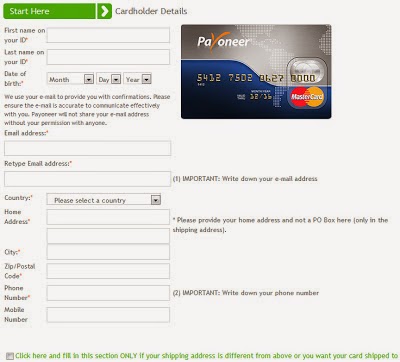
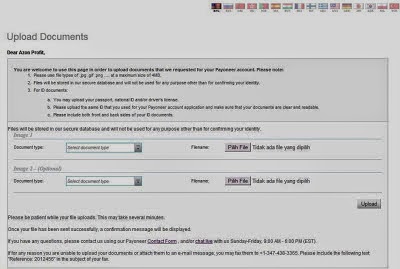
Get Verified Button එක ඔබන්න. එතකොට පල්ලෙහ පිටුවට එයි ඒකෙදි තියෙන විස්තර පුරවලා'Continue ' කරන්න.

විස්තර හරිනම් ඔයා වතව පිටුවකට එවයි, එතනදි ඔයාගෙන් අහයි ඉලක්කම් 4රේ කෝඩ් එක මොකද්ද කියලා, මේ කෝඩ් එක ලැබෙන්නෙ ඔයාගෙ බැන්කුවට. ඔයාට කරන්න තියෙන්නෙ බැන්කුවට කෝල්කරලා ඔයාගෙ පෙයිපෑල් කෝඩ් එක ඉල්ලගන්න එක. ඊට පස්සෙ ඒක හරියට ටයිප් කරලාSubmit ඔබන්න. Credit Card එකෙන් ගිනුම වෙරිෆයි කරන්නෙ ඔහොමයි, ඊලගට අපි බලමු කොහොමද එකෙන් ගිනුම වෙරිෆයි කරන්නෙ කියලා.
Paypal Verification through Debit Card Method
මුලින්ම කියන්න ඕන මේ ක්රමේ ටිකක් සන්කීර්ණයි හැබැයි හොදම මේක. මමත් මගේ ගිනුමට ලින්ක් කරලා තියෙන්නෙ Debit Card එකක්. මොකද ඔයා පෙයිපෑල් එකෙන් මිලදී ගැනීම් කරනකොට ඔයාගෙ මේ කාඩ් වලින් තමයි සල්ලි යන්නෙ. Debit Card පාවිච්චි කරනකොට ඔයාගෙ බැන්කු ගිනුමෙ තියෙන සල්ලි ප්රමානය විතරයි යන්නෙ, ඒත් Credit Card පාවිච්චි කරනකොට සීමාවක් නෑ ඕනතරම් පුලුවන් මිලට ගන්න. පස්සෙ Statement එක එන කොට තමයි ඔලුව ගිනි ගන්නෙ. ඒක හින්ද ස්වයන්ග් පාලනයක් ඇතිකරගන්න හොදම එක තමයි Debit Card. අනික Withdraw කරාමත් බැන්කු ගිනුමට එන සල්ලි ගන්න පුලුවන්නෙ. Credit Card එකේදි වෙන්නෙ සාමාන්යෙන් එකේ ණයක් තියෙනවනම් ඒ ගාන Statement අඩුවෙන එකයි, මම හිතන්නෙ. ඒක අහලා බලන්න කොයිකටත් බැන්කුවෙන්.
සාමාන්යෙන් පෙයිපෑල් එක්ක Debit card වලින් ගනුදෙනු කරන්න ඉඩ දෙන්නෙ සමහර බැන්කු විතරයි. Sampath, HNB Debit card වගේ ඒව වතරයි අනිත් බැන්කු කොහොමද දන්නෙ නෑ.
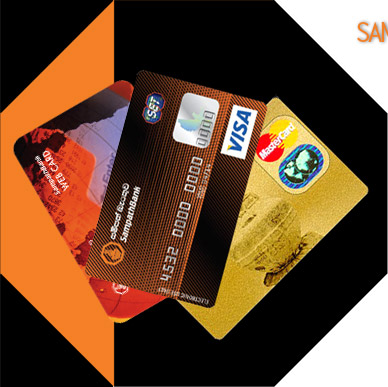
If your Debit Card isn’t a Sampath VISA Debit Card it isn’t a Debit Card at all!
- Make all your transactions with one card.
- Withdraw cash 365 days a year, 24 hours a day with over a million ATM’s worldwide.
- The ability to withdraw money from any Cargills Food City outlet without an ATM (To be activated soon)
- World-wide acceptance at over 20 million merchant outlets.
- Know exactly what’s happening on your account-receive SMS alerts after every transaction.
- Enjoy special discounts from selected merchants. 100% security.
So always keep your Sampath VISA Debit Card in your wallet!
Current Sampath VISA Mini Debit Card holders can obtain the Sampath
VISA Debit Card for FREE from any Sampath Bank Branch.
ANYBODY TELL ME CAN I VERIFY PAYPAL USING THIS CARD ??????
YES YES YES YES
හරි දැන් ඒකත් දැක්කනෙ තව විස්තරයක් සම්පත් Debit Card එක ගැන බලන්න.
Now I'm Going to help those guys who trying to Create PayPal Account Using Sampath Web Card.
I must specially mention that "I Will Not Guarantee" if there are anything going wrong but this source is clear.
Step By Step Instructions are given below :
Who are volunteers : Every On above age 18
Starting Values : Rs.2500 / Rs.5000 / Rs.7500 / Rs.10000
Cost For The Card
Sampath Bank Account Holders : Rs.100/=
Others : Rs.200/=
Expiration : After 2 years card active
Fully Cost For Card With Minimum Credit
Sampath Bank Account Holders : Rs.2600/=
Others : Rs.2700/=
Top Up : Which you want
Availability : Any web site that accept PayPal
Credit Balance : Call to Sampath Card Center 011-2300604 & Give Your ID & Ask For Balance
You Have To Follow These Steps To Connect Your Card To PayPal
=================================================
1.) Go to the http://www.PayPal.com & Create a PayPal (It's Free So No Probs)
2.) Click the "My Account" --> "Profile" --> "Add/Edit Credit Card"
3.) Then Click "Add Card"
4.) Now you will see a form & fill it
First Name : Give your real first name
Last Name : This you can't change
Select Card Type : Visa (Sampath Web Card Is A Visa Card)
Card Number : Enter The 16 Pin Code Appear On Side Of Your Card. (Do not let hash or spaces)
Expiration Date : This date mention as VALID THRU on your Card. Enter that year & month
Card Verification Number : Enter Your 3 Pin Code (Password)
Billing Address : Select Your PayPal Account address or Enter a new address
5.)After complete above steps click "Add Card" button
(If their appear Error message that means your Sampath Web Card still didn't activate)
(If their is no error message PayPal already accept your Web Card as a valid card.)
Almost done . . . . . .
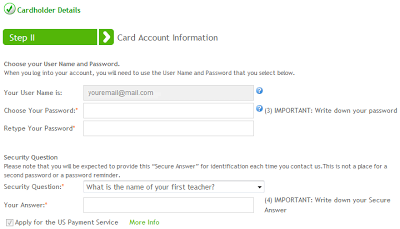
6.) Then will appear window like this.. Click "Save &
Continue" (Firstly PayPal debit $1.95 from your account credit for their account but this credit give you back definitely after you done successfully)
7.) Then you will see what are you already done & what will have to do. In this moment they say "Check your bank sheet & enter PayPal Code"
8.) But our Sampath Web-card has not supply a print sheet... So you will have to call to Card Center 011-2300604 & ask for Web-card PayPal Code . . . After that they will ask for Web-card pin number. (16 number).
9.) Then you will receive The PayPal Code & Enter it in PayPal Code entering area.
10.) Read details & instructions carefully then click clearly "Submit" button...
11.) After that if you will see that your Web-card has been accepted by PayPal now you can pay amount as you wish.
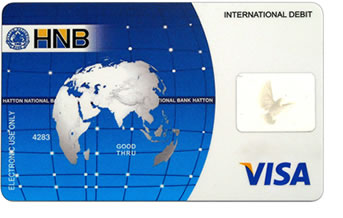
දැන් සම්පත් කාඩ් එක ඉවරයි දැන් පෙන්නන්නම් HNB Debit Card එක ගැන මම ගත්තෙ කාඩ් එක හින්දා මම ඒගැන ඔයගොල්ලන්ට මගේ අත්දැකීම කියලා දෙන්නම්.
මුලින්ම ඔයගොල්ලො Debit Card එකකට ඇප්ලයි කරලා ඒක ගන්න. ඊට පස්සෙ බැන්කුවෙන් අහන්න මට ඕන මගේ එක Debit Card පෙයිපෑල් වලට සම්බන්ද කරන්න, එහෙම කරාම මට පෙයිපෑල් එකේ සල්ලි Withdraw කරන්න පුලුවන්ද අහන්න කාඩ් එකට. ඒ ගොල්ලො හා, කිව්වොත් වැඩේ හරි. ඒ ගොල්ලො සමන්යෙන් මාස කිහිපයකට විතරයි කාඩ් එකේ පිටරට Transactions ඇක්ටිව් කරලා තියන්නෙ, ඒක හින්දා ඔයාට පිටරට, උදා: පෙයිපෑල් ගනුදෙනුවක් කරන්න ඕනනම් බැන්කුවට කියන්න වෙනවා.බැන්කුවට කිව්වට පස්සෙ පෙයිපෑල් එක වෙරිෆයි කරන්න කරන්න තියෙන්නෙ පල්ලෙහා ටිකමයි වගේ.
- පෙයිපෑල් ගිනුමට ගිහිල්ල ගිනුම කාඩ් එකෙන් වෙරිෆයි කරන එක.
- Get Verified Button එක ඔබන්න. එතකොට පල්ලෙහ පිටුවට එයි ඒකෙදි තියෙන විස්තර පුරවලා' Continue ' කරන්න.
- විස්තර හරිනම් ඔයා වතව පිටුවකට එවයි, එතනදි ඔයාගෙන් අහයි ඉලක්කම් 4රේ කෝඩ් එක මොකද්ද කියලා, මේ කෝඩ් එක ලැබෙන්නෙ ඔයාගෙ බැන්කුවට
- බැන්කුවට කෝල්කරලා ඔයාගෙ පෙයිපෑල් කෝඩ් එක ඉල්ලගන්න එක. ඊට පස්සෙ ඒක හරියට ටයිප් කරලා Submit ඔබන්න.
ඔහොම කාඩ් එක වෙරිෆයි කරාට පස්සෙ පෙයිපෑල් එකෙන් සල්ලි Withdraw කරනකොට බැන්කුවට කියන්න මම මෙහෙම Withdraw එකක් කාඩ් එකට පෙයිපලෙ වලින් කරනවා කියලා.
අම්මෝ, ඔන්න ඔය ටික තමයි කියන්න ඕන වෙලා තිබ්බෙ පෙය්පෑල් වෙරිෆයි කරන එක ගැන. මමලියපු පෝස්ට් එකත් කියවලා බැන්කුවලිනුත් අහලා හොදම, ආරක්ෂිතම දේ කරන්න.
එහෙනම් හැමෝටම සුභ දවසක් !
Read More...











 Hi! I am Dulshan, a Pro Blogger, an E-money Guider for the those who need. I have created both Internet Money in Sinhala and Blogging Industries and currently runs them. Helping to the People who struggle to make money from the Internet is the cause which motivate me in creating the Site.